
The AX-1 keeps the spray boom at a precise distance from the ground using a height sensor on each nozzle module. The boom averages these readings and adjusts the lift to hold the target distance, by default: 15 cm from the nozzle outlets to the ground. Accurate height is essential for droplet placement and spray pattern, so the sensor calibration should be checked periodically.
When to run the check
We recommend checking height sensor calibration:
- Periodically, as part of your routine maintenance.
- At the start of each spraying season, before the machine goes back into regular use.
- After transport or any event where the boom or nozzle modules may have been bumped.
- If you notice issues with spray coverage or pattern that aren't explained by the nozzles themselves.
What you'll need
- A flat, level surface to park the AX-1 on.
- A measuring tape or ruler.
- Correct tire pressure (an uneven machine will throw off the check).
How to check
- Park the AX-1 on a flat, level surface.
- Open Kilter Remote.
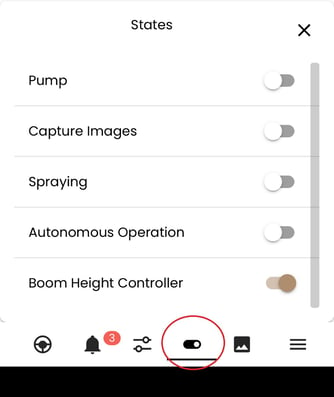
- In the bottom bar tap on States button
 and enable the Boom height controller toggle.
-
Wait for the boom to settle at its target height (15cm by default).
-
With a measuring tape, measure from the ground to the top of a nozzle module in the centre of the boom, as shown in Figure 1.
%20(1).png?width=485&height=588&name=image%20(6)%20(1).png)
Figure 1 Measurement reference, 15 cm from the nozzle outlet to the ground, or 40.5 cm from the top of the nozzle module to the ground.
What the measurement should show
The target distance from the top of the nozzle module to the ground is 40.5 cm ± 1 cm.
That number comes from the calibration reference: 15 cm from the nozzle outlet to the ground, plus 25.5 cm from the nozzle outlet up to the top of the module. Measuring to the top is just more practical than measuring to the outlet itself.
If the reading falls within 40.5 cm ± 1 cm, the height sensors are correctly calibrated and no action is needed.
If the reading is outside tolerance
If the measurement is more than 1 cm off from 40.5 cm, you can recalibrate the height sensors yourself from Kilter Remote.
-
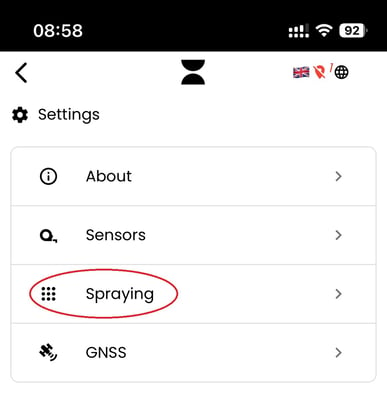
Go to settings
-
Tap on Spraying
-
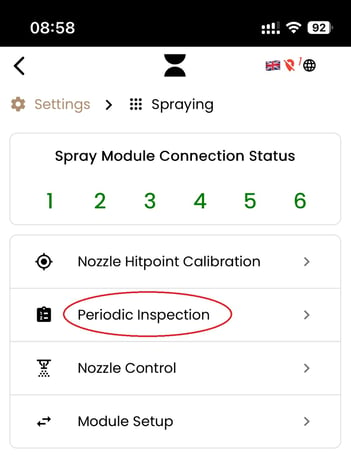
Tap on the periodic inspection.
-
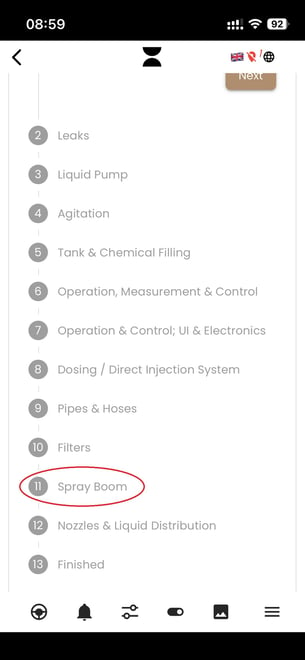
Scroll down to step number 11 and tap spray boom.
-
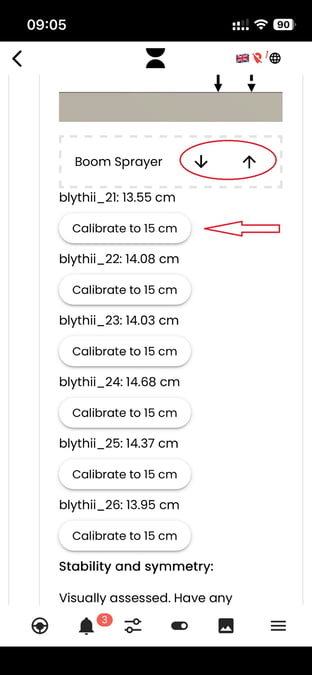
You can use the up and down arrows next to the Boom Sprayer label at the top of the step to nudge the boom to its true 15 cm position (40.5cm from the top, Figure 1).
-
Once the boom is physically at the correct height, press Calibrate to 15 cm next to each nozzle module. This sets that module's sensor zero to the current position.
-
Re-run the verification check from the previous section to confirm the automatic controller now holds 40.5 cm ± 1 cm and that all modules report offsets close to 0 cm.
If a module's offset still drifts after recalibration, or you see unusually large deviations across all modules at once, get in touch with Kilter support, there may be a sensor or mechanical issue that needs a closer look.
Why this matters
The height sensors are what keep the boom at the distance the spray system was designed and calibrated for. If the boom sits too high or too low:
- Droplets may miss the intended target.
- Spray pattern overlap between modules can change.
- Camera-nozzle calibration assumptions no longer hold, which affects precision.
A two-minute check protects all of that, so it's worth building into your routine.