
We will soon add the ability for operators of AX-1 to review images and plant detection while being away from the machine. We hope this will enable operators to detect the unlikely scenario of a treatment going wrong as early as possible.
What’s coming:
- Get a reminder 10 minutes after starting an autonomous run to review images from the robot
- Review plant images and detection from the Kilter Remote app, even while away from the machine
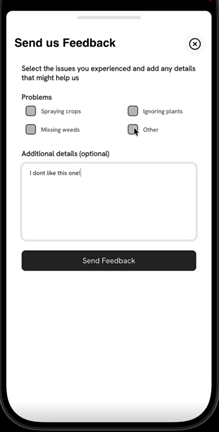
- Give feedback with a thumbs up or down, and add details when detection is below expectation
- Stop the machine remotely if plant detection is performing poorly
To review the plant detection, enter the Kilter Remote app, select an AX-1 machine from your list of equipment and click on the plant icon on the right side of the bottom menu bar:
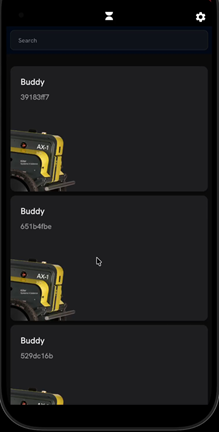 →
→ 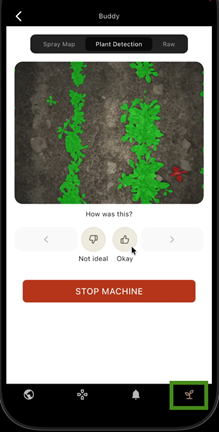
Thumbs up or thumbs down will enable you to go to the next image. If plant detection is below expectation, you can hit the thumbs down to let us know. We encourage you to add additional details so we can fix the issue more effectively:
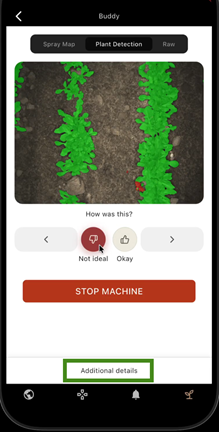 →
→ 
If the image and plant detection looks okay, press thumbs up to go to the next image.
Stopping the machine
If you want to stop the machine due to poor performance of plant detection, press the big red ‘Stop Machine’ button below the image and other buttons. After confirming the machine should be stopped, it will stop immediately.
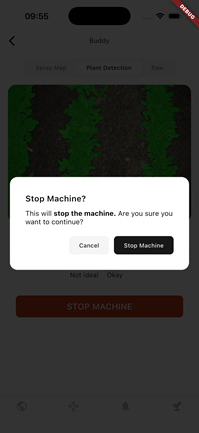 →
→ 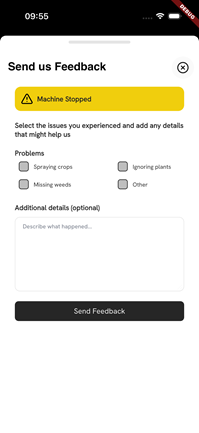
We hope that you can take the time to describe why the machine was stopped in the feedback form that will appear afterwards. This will help us to address the issue quickly.
ImportantPlease note that users of AX-1 should always check that plant detection is working properly after having started an autonomous run. Operators will be notified 10 minutes after starting the autonomous run to review the images.