
You can tell your robot to stop when it reaches the end of the row it is working on, or the row after that, straight from the Kilter app. The robot finishes the row and stops in the headland, so no part of a row is left half treated.
This is useful when you want to refill the tank, end the working day, or move the robot to another field without stopping it in the middle of the crop.
Before you start
- The Kilter app installed and signed in on your phone
- Access to the robot you want to stop
- A connection to the robot: check that the robot panel shows Last seen just now before you send a stop command
How to stop at the end of a row
- Open the Kilter app and tap the robot you want to stop. The robot opens on the map, with its position shown as a green dot.
- Find the status panel at the bottom of the screen. It shows the tank level and when the robot was last seen.
- Swipe the panel up by dragging the grey handle at its top. The stop options appear under the status.
- Tap Stop at end of current row or Stop at end of next row.
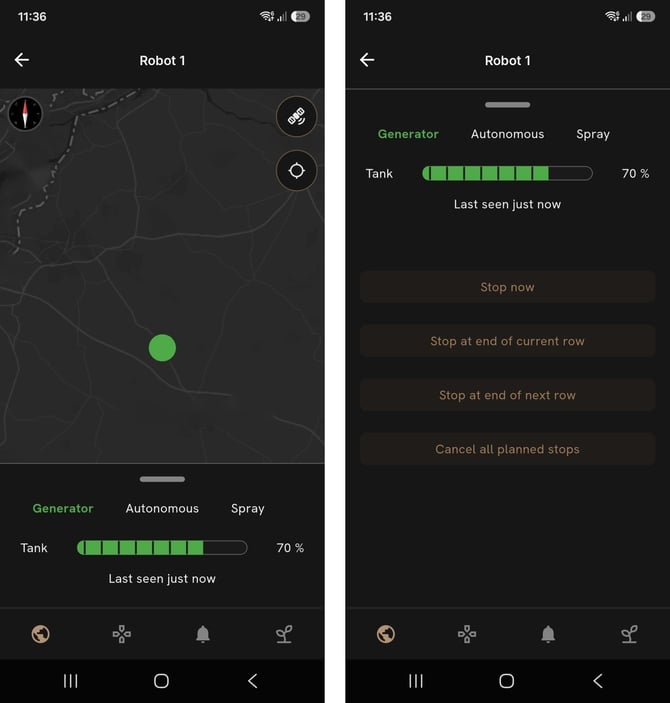
The robot keeps working until it reaches the end of the chosen row, then stops.
The stop options
| Option | What the robot does | Use it when |
|---|---|---|
| Stop now | Stops where it is, in the middle of the row | You need the robot to stop right away |
| Stop at end of current row | Finishes the row it is in, then stops | You want it to stop as soon as possible without leaving a row unfinished |
| Stop at end of next row | Finishes the current row and one more, then stops | You want it to end up at the other side of the field, or the current row is almost done |
| Cancel all planned stops | Removes any end of row stop you have set and keeps working | You changed your mind |
Changing your mind
To remove a planned stop, open the same panel and tap Cancel all planned stops. The robot continues working as normal. To pick a different row, cancel first and then choose the new option.
Tips and safety
- Check the tank level in the same panel. If you plan to refill, stopping at the end of a row lets you reach the robot from the headland.
- If the panel does not show Last seen just now, the robot may not receive your command. Wait for the connection before you rely on a planned stop.
- The stop buttons in the app are not an emergency stop. In an emergency, use the emergency stop on the robot.