![kilterlogo big_big.png]](https://learn.kiltersystems.com/hs-fs/hubfs/kilterlogo%20big_big.png?height=40&name=kilterlogo%20big_big.png)
The machine requires maintenance at specific intervals. Some repairs and maintenance tasks can only be performed by service personnel authorized by Kilter, e.g. annual maintenance and specific function testing of the robotic sprayer (every three years).
| AX-1 Maintenance check schedule | ||||
| Regular check period | ||||
| System/Module | Item | Each use | First month | Every 3 months |
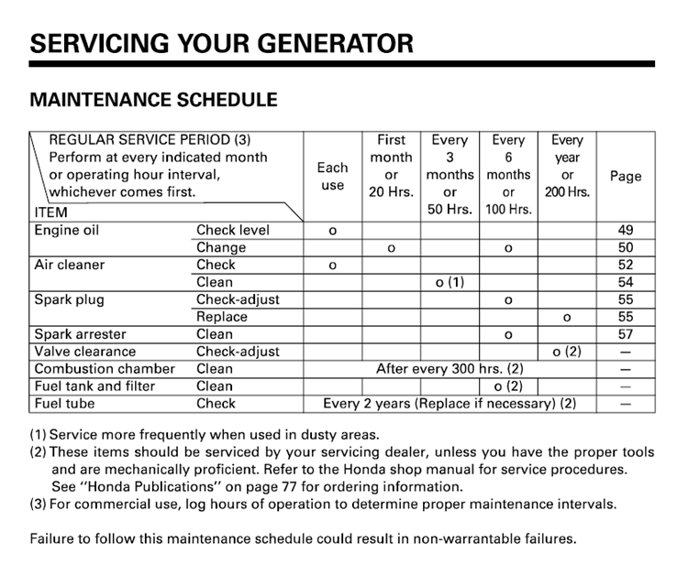
| Generator | *Please refer to the generator maintenance schedule | |||
| Inspect starter cord for wear | x | |||
| Liquid system | Verify tank measurment level, visual and in app | x | x | |
| Inspect tubes and connctions | x | x | ||
| Inspect couplings and o-rings | x | x | ||
| Clean filters, pump and tank | x | x | ||
| Spray system | Clean camera windows | x | ||
| Clean around spray nozzles | x | |||
| Inspect for damages on nozzles | x | |||
| Visual inspection and sound of droplets during purge | x | |||
| Lift module | Check for abnormal noise and vibrations | x | ||
| Test normal operation up/down | x | |||
| Control unit | Clean inlet air-filter | x | ||
| Clean outlet air-filter | x | |||
| First aid | Check expiration date on eyewash | x | ||
| Emergency stop | Test emergency stop buttons | x | x | |
| Test the bumper emergency stop functionality | x | x | ||
| Tires | Inspect for damages and wear | x | ||
| Check air pressure | x | x | ||
| Frame | Check for damages in general | x | ||
| Check rear wheel alignment | x | |||
| Check bolts for proper tightening | x | |||
General Safety for Maintenance and Repairs
Warning: Risk of pinching, cutting, shearing, severing, entrapment, entanglement, pulling in, catching, and impacts at unprotected danger points!
- If covers or other protective equipment are removed during maintenance, repairs, or cleaning, they must be reinstalled afterward.
- Damaged protective equipment must be replaced.
Warning: Follow the safety instructions during all maintenance, repairs, and servicing activities.
Washing, Servicing, and Maintenance
Regular and properly executed maintenance helps extend the machine's service life and improves operational reliability. The product warranty is valid only if the maintenance schedule is followed.
All spare parts must be original parts supplied by Kilter AS.
Before performing service and repairs:
- The machine must be emptied of spray agents, and the circulation system must be cleaned.
- The machine must be externally cleaned to eliminate the risk of contact with spray residue.
- The machine’s main power switch must be turned off during all maintenance and repair work.
Before Each Startup:
Inspect hoses, pipes, valves, and connection parts for leaks, wear, and defects. If faults are detected, they must be repaired and/or reported immediately.
Internal Cleaning of the Spray System
CAUTION: Always use the necessary safety equipment when draining spray agents.
Draining the Spray Tank
Warning: When draining spray agents from the tank and disposing of residues from cleaning, no discharge into the environment is permitted. Spray residues must be collected, labeled with their contents, and delivered to a hazardous waste disposal facility.
Important: Ensure there is a collection container placed under the drain point.
After spraying, there may be residue of the spray mixture in the tank. This must be drained into an appropriate container before cleaning can begin. Follow these steps to drain the spray mixture from the tank:
- Place a collection container under the drain point.
- Set the valves to the "Drain System" position and start the pump.
- Allow the pump to run until the tank is empty of spray mixture.
- Open Valve 7 to release the last remnants.
- Prepare to rinse the tank, hoses, and nozzle blocks by setting the valves to the "Rinse System" position.
Cleaning the Spray System and Tank After Use
The washing procedure is available in Kilter Remote. Follow the step-by-step guide, as it provides access to necessary machine controls and up-to-date procedures. Refer to the label under the left cover of the machine for illustrations of commonly used valve positions.
CAUTION: Ensure the spray tank is empty before cleaning the system.
The washing process follows the principle of stepwise dilution of residual spray agent. The liquid system must be rinsed and flushed with a washing nozzle three times using water. After each step, the rinse water is drained.
Cleaning the Spray System When Spray Agent is in the Tank
CAUTION: Ensure that Valves 2, 3, and 4 are closed to prevent unintended dilution of the spray agent.
- Place a collection container under the drain point.
- Set the valves to “Rinse System,” except for Valve 3, which remains closed, and Valve 6, which is opened.
- Run the pump until all the water in the rinse tank is used. Perform two rounds of Nozzle Rinsing (accessible in Kilter Remote) while the water flushes the system.
- Set the valves to the “Normal Operation” position.
Residual Volume After Draining
After completing the cleaning procedure for the spray system after use, a small residual volume (< 0.1 L) of spray agent may remain in the tank. This can be drained manually by opening Valve 7.
Changing Spray Agents
When changing spray agents, use a soap specifically designed for cleaning spray equipment.
Nozzles
Important: The nozzle blocks must always be cleaned with clean water after use.
Failure to clean can result in leaks and blockages in the nozzle outlets.
The nozzle modules are precision instruments. To maintain their precision, it is essential to rinse them with water after use while running the cleaning procedure for nozzle modules (available in Kilter Remote). This can be achieved by performing: Cleaning the Spray System and Tank After Use or Cleaning the Spray System When Spray Agent is in the Tank.
Cleaning the Machine
Warning: Always use the recommended protective equipment when washing the machine, as spray residue may be present on the machine.
Important:
- Use low-pressure water when rinsing the outside of the tank to minimize water contact with the underside of the control panel and the generator.
- Do not use soap to clean the nozzle blocks. Soap can compromise the sealing capability of the nozzles, leading to leaks. Only clean with water.
- Do not use paper or lint-producing cloths to clean the nozzle blocks. Debris and lint can cause leaks and reduce the droplet quality from the nozzle outlets.
- The machine must always be turned off during cleaning. If the machine is on, the fans may draw in water, potentially damaging the electronics of the control panel.
- The generator must always be turned off, and its power cord disconnected during machine cleaning.
- Do not spray the wind sensor with high-pressure water.
External Cleaning
Important: Do not clean the machine at close range (less than one meter) with a high-pressure washer or other high-pressure water sprayers. High-pressure water can penetrate and damage the electronics.
The machine can be cleaned externally using a water hose, soap, and a sponge or lint-free cloth.
Internal Cleaning
Warning: Never clean the inside of the control panel.
Important:
- Use low-pressure water when rinsing the tank’s exterior to minimize water contact with the underside of the control panel and the generator.
- Do not use soap to clean the nozzle blocks. Soap can damage the nozzles’ sealing capability, causing leaks. Use only clean water.
- Do not use paper or lint-producing cloths to clean the nozzle blocks. Debris and lint can lead to leaks and reduce the droplet quality from the nozzle outlets.
The tank module under the left side cover can be cleaned using a low-pressure water hose, sponge, or lint-free cloth. Soap may be used but ensure no soap residues enter the tanks.
The generator under the right side cover should not be cleaned using a water hose. Use a sponge or a damp, lint-free cloth instead. Soap may be used, but ensure no soap residues enter the fuel tank.
The spraying units and the rest of the inside of the boom can be cleaned with a low-pressure water hose. A sponge or lint-free cloth can also be used, but ensure no lint or debris enters the nozzle holes in the nozzle block. Do not use soap, as it can compromise the functionality of the nozzles if it enters the nozzle holes.
Spray Unit
Important: Do not use a high-pressure washer for external cleaning of the spray units. This can damage the nozzles and electronics. When using a water hose, avoid directing the stream straight into the nozzle outlet.
Spray fluid may accumulate on the nozzles after use. This should be cleaned with a gentle rinse using low pressure from a water hose.
If there are issues with the spray units, contact Kilter AS for support. Do not attempt to repair this unit on your own without approval from Kilter, as this will void the warranty.
Filter for Spray Unit
Each spray unit is equipped with a fine-mesh inlet filter to capture small particles. The filter is of type 250 mesh and requires regular cleaning to maintain proper flow. Residual spray agents caused by inadequate cleaning of the spray system can lead to clogged filters. It is therefore crucial to inspect the filters' condition before use.
Cleaning Procedure:
If there is liquid in the tank, disconnect both hoses of the spray unit from the boom. Unscrew the filter cup. Remove the filter screen from the filter cup. Submerge it in soapy water and allow the soap to dissolve any residual spray agents. Rinse both the filter and the filter cup thoroughly with clean water.
In some cases, compressed air can be used to blow the filters clean instead of using soapy water. Regardless of the method, ensure the filter is rinsed in clean water as the final step.Suction Filter
The suction filter is located at the front of the tank, beneath the left side cover, positioned in the fluid line before the pump (refer to Figure 12 for illustration)
The filter must be emptied and rinsed with clean water regularly, as needed. Ensure the filter is free from visible particles before reinserting it into the filter housing. Inspect the filter screen visually before each use. If the filter has been clogged and a deformations has occured it should be swapped with a new filter, this is also a good indication that inspection and cleaning of the filter needs to be performed more often.
The filter is equipped with a magnet to capture metallic particles. Clean the magnet by wiping it off, blowing it clean with compressed air, or using tape to remove debris. Check and clean the filter, particularly before and after long-term storage of the machine.
Warning: Individuals with pacemakers should avoid handling magnets.
Warning: Wear safety goggles and gloves when handling large magnets. Avoid pinching fingers between magnets or letting them collide with other magnets or metallic objects, as collisions can cause magnets to crack.
Important: Strong magnetic fields can permanently damage items such as credit cards, hard drives, watches, and other electronic devices.
Ensure the filter screen is centered in the filter housing before tightening the lid. Misalignment can damage the filter when the lid is secured.
Important: If the filter is defective and its filtration capability is compromised, it must be replaced with a new filter before the machine is put into operation.
Pump
Perform the internal rinse procedure described in Subchapter 9.3 after each spraying session to maintain the pump. If leaks occur or replacement parts are needed, contact your Kilter customer representative for further assistance.
Tank Strainer
Remove the tank strainer from the tank opening, empty it, and rinse it with clean water regularly or as needed. Ensure the strainer is free of visible particles before reinserting it into the tank opening.
Control Unit
Any issues related to the Control Unit must be addressed by authorized service personnel, particularly in situations that involve opening the cover of the unit. The inside of the control Unit contains exposed high-voltage points and other sensitive components.
Danger: Contact with high-voltage points poses an immediate life-threatening risk
It is strongly discouraged to connect a personal computer to the control panel's ports for troubleshooting or software updates, as this can result in critical software errors.
Service and maintenance tasks that users may perform themselves include cleaning the exterior of the control panel and cleaning/replacing the air filter.
Air Filter
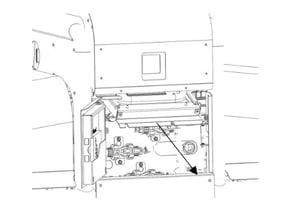
The control panel is equipped with an air filter located at the air intake on the front of the robot. This filter must be cleaned as needed or every two weeks during the operational season.
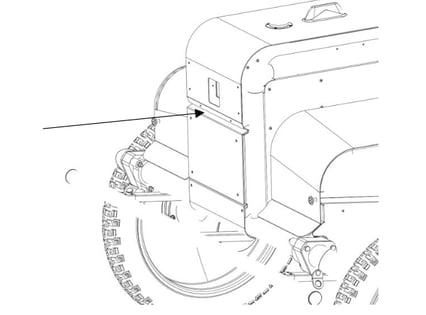
Cleaning Procedure:
- Step 1: Open the front door by operating the red handle located under the left side cover.
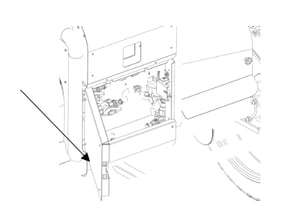
- Step 2: Loosen the two screws at the bottom of the filter tray, beneath the control panel.
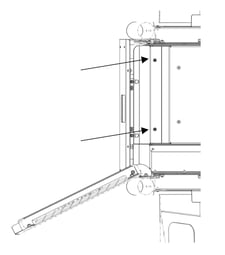
- Step 3: Tilt the filter tray downward and then pull it out.
- Step 4: Unscrew the gasket plate from the filter tray.
- Step 5: Remove the two air filters. Clean the filters by either washing them with lukewarm water or vacuuming them. Ensure the filters are completely dry before reinserting them into the machine. Alternatively, replace the filters with two new Xiaomi filters (model SDLW04RR).
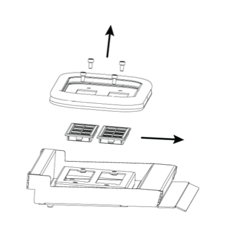
- Step 6: Reverse Steps 1–4 to reinstall the filters and secure the filter tray back in the machine.
The control panel also has an internal filter located at the rear air outlet. This filter prevents dust and debris from passively entering the control panel when the machine is not in use. This internal filter should only be cleaned or replaced by authorized service personnel due to its location inside the control panel. This filter does not require cleaning as frequently as the intake filters.
Generator
CAUTION: Familiarize yourself with and adhere to the specific warnings in the generator's user manual regarding service and maintenance.
Note: Several of the generator's service and maintenance tasks require the generator to be removed from the machine. It may be practical to perform multiple service tasks simultaneously when the generator is removed.
Refueling the Generator
Refueling can be done with the generator mounted in the robot. Ensure the generator is turned off during the process.
Use 4-stroke alkylate gasoline/environmentally friendly gasoline or gasoline with ≥95 octane.
Open the generator’s fuel cap. Place the cap in a clean location to prevent dirt from contaminating the fuel tank during reassembly.
Pour gasoline into the generator’s tank. If the fuel canister includes a hose or funnel, use it to prevent spills. Stop refueling before the tank is completely full to allow the cap to be securely closed without overflow.
Screw the fuel cap back on securely.
Once refueling is complete, the generator can be restarted.
Oil Change
CAUTION: Used oil drained from the generator must be disposed of as hazardous waste at a recycling station.
Perform oil changes regularly as outlined in the generator's user manual.
Oil Change Procedure:
- Step 1: The generator must be removed from the machine to perform an oil change. Unscrew the four screws securing the generator baseplate to the machine.
- Step 2: Tilt the generator slightly upward at the front, then lift the generator and baseplate diagonally out of the machine. Use the generator’s carrying handle for safe lifting.
- Step 3: Refer to the generator's user manual for the specific steps to change the oil.
- Step 4: Place the generator and baseplate back into the machine’s right compartment. Tilt the rear end slightly downward to facilitate proper placement.
Cleaning the Generator’s Air Filter
The air filter should be cleaned regularly as specified in the generator's user manual.
- Step 1: The generator must be removed from the machine for cleaning the air filter. Unscrew the four screws securing the generator baseplate to the machine.
- Step 2: Tilt the front of the generator slightly upward, then lift the generator and baseplate diagonally out of the machine using the carrying handle.
- Step 3: Refer to the generator’s user manual for detailed cleaning instructions.
- Step 4: Place the generator and baseplate back into the machine’s right compartment. Tilt the rear end slightly downward to ease the reinstallation process
Maintenance of the Generator’s Spark Plug
Regularly inspect and replace the spark plug as recommended in the generator's user manual.
The spark plug can be inspected or replaced without removing the generator from the machine.
Follow the procedures outlined in the generator’s user manual.
Other Generator Maintenance and Service
For additional maintenance and service tasks such as checking/adjusting valve clearance, cleaning the combustion chamber, cleaning the fuel tank and filter or inspecting the fuel hose, please refer to the generator's manufacturer and user manual (picture below for reference).