
AX-1 needs GNSS correction data to navigate in the field. This is expected to be handled by the farmer/user. NTRIP credentials and mount point can be set using the “Kilter Remote” app.
Setting the credentials
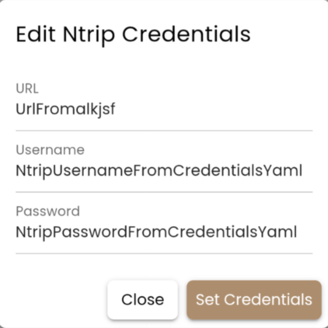
While connected to the robot, set the NTRIP credentials as follows:
- Navigate to the “Settings” tab.
- Choose the “GNSS” drop-down.
- Click “Ntrip Credentials”.
- Enter the Username, Password and URL.
The URL is built up as [link]:[port]/[MountPoint]. See the example below or contact your NTRIP provider if you run into problems. The Fix Status should change to “RTK fix” or “RTK float” if the credentials are correct.
Example:
|
URL |
no.nrtk.eu:9301/MSN_iMax |
|
Username |
NtripUsername |
|
Password |
Password |
NTRIP credential character limits for Septentrio
The provider Septentrio enforces a maximum length on each NTRIP parameter. If a value exceeds the limit, the receiver will not accept the credentials, and the Fix Status will not change to “RTK fix” or “RTK float”.
|
Parameter |
Max characters |
|
Host |
40 |
|
Mountpoint |
32 |
|
Username |
20 |
|
Password |
32 |
NTRIP credentials troubleshooting
If your NTRIP provider has issued a host, mountpoint, username or password that is longer than the limit above, the receiver cannot store the full value. In that case:
- Double-check the values for accidental extra spaces or characters.
- Contact your NTRIP provider and ask whether shorter credentials within the limits can be issued.
- If you are still unable to connect, contact Kilter Support at: support@kiltersystems.com