![kilterlogo big_big.png]](https://learn.kiltersystems.com/hs-fs/hubfs/kilterlogo%20big_big.png?height=40&name=kilterlogo%20big_big.png)
What’s new?
- A new settings page; Module Setup; for configuring new/replacement spraying modules with the correct spot number. Check out this Kilter Learn guide on how this can be used.
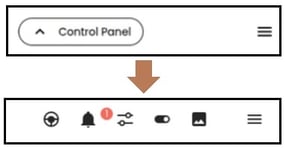
- The Control Panel button is now removed. All the actions are now visible at all times. This change was necessary for addressing a fault where the driving-joystick could get stuck.
- Wheel motors: Added temperature and power monitoring to avoid unnecessary high usage when not moving
- Improved notification messages if safety stop or bumper is triggered at boot.
- The clean nozzles action can now be cancelled
- Improvements to the period inspection guide
- Added more translation languages
How to update robot
- Connect to the robot with the Kilter Remote app
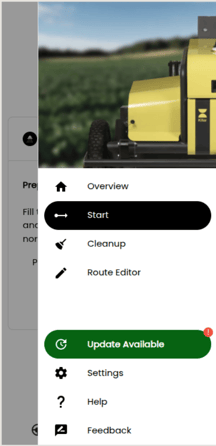
- Navigate to the side menu
- Click the green "Update Available" button and follow the instructions on the screen