
⚠️ Updating the machine to version 29.09.0 will require you to perform a recalibration of the spray modules. Make sure the robot is on a flat surface after updating and follow the procedure described in this help article: Calibrating the spray module
What's new?
Improved Spray Precision
The spray precision has been improved at higher operating heights. However, the precision remains the same for the recommended operating height of 15 cm. Installing this update can cause small offsets from the last calibration, which is why all spray modules will need a recalibration.
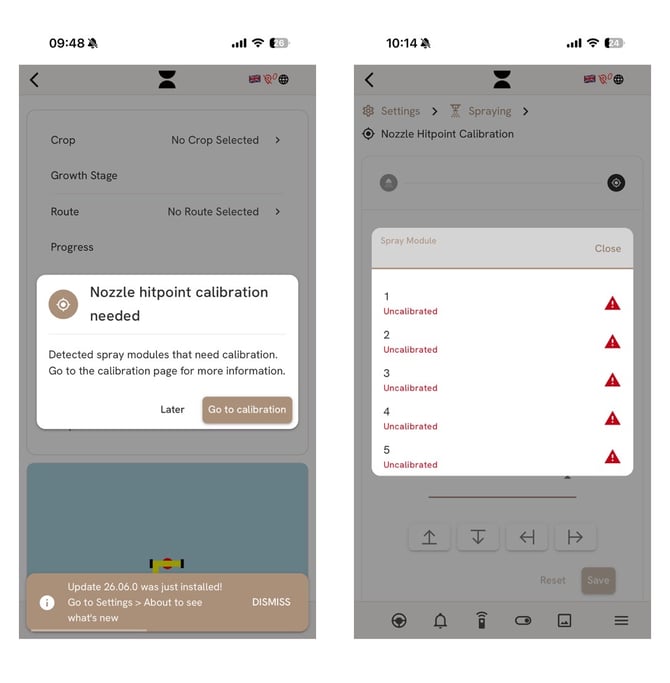
A popup window, like the one shown below, will appear after successful update and navigate you to the calibration menu. The process is simple, but we do recommend you read the article on how to do this, linked above.
Validation of Routes
When selecting a route to spray, the app will perform a quick analysis to ensure that there are no troubled segments that can impose a risk to its surroundings or the AX-1 itself. Following this update, troubled segments are no longer just a warning. If the route fails the validation, you will have to fix it to start the operation. Troubled segments can include:
- Sharp turns in the middle of a row.
- Spray segments intersect or if they are too close.
- Wrong direction on consecutive segments.
- Large gaps between consecutive segments.
Updates on AX-1 Show Progress
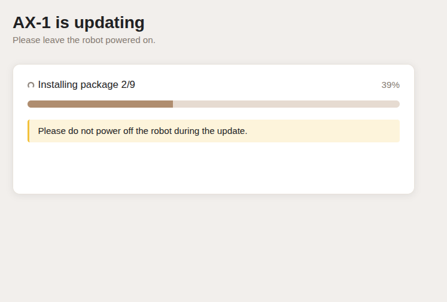
You will now be able to follow the update progress! Instead of disconnecting you from the robot, future updates will redirect you to a screen showing the progress of the installation. If something goes wrong, you will be notified of what went wrong and an option for retrying will be available.
Note: The progress page will only show for updates following this 26.09.0
Improved Notifications
- When the robot completes a route, it will send out a notification.
- You will be reminded to check the image viewer in the app after a route session has been started. This is to ensure that the cameras get clear pictures and that the crop is detected correctly.
- A notification will be sent if the main computer overheats, and the machine will stop operations as a safety measure.
Minor Updates/Fixes
- Visual refresh: new fonts, icons, and images.
- Several changes to improve logging and support tooling.
- Improved spray module active/inactive reporting.